
<img height="1" width="1" style="display:none" src="https://q.quora.com/_/ad/1fc39a3687c042b3a3e2749da1d6fa61/pixel?tag=ViewContent&amp;noscript=1">
Skip to content
  • There are no suggestions because the search field is empty.

How to find Gateway Id on M&T Merchant Services Merchant Portal

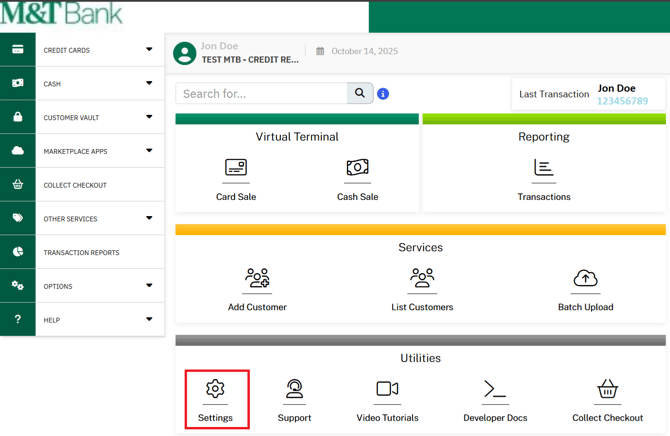
If you are an M&T Merchant services user, once you log into your Merchant portal with your username and password, you will see your merchant dashboard, you will your merchant dashboard

Step 1. Log into your Merchant portal
find Gateway Id-1


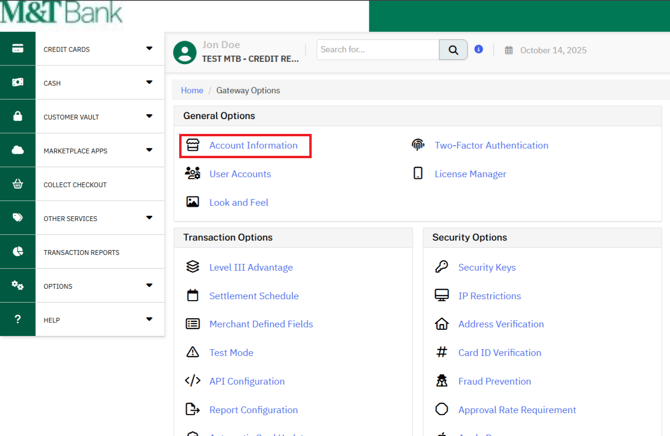
Step 2. Click on the Settings link / icon, you will see the settings page.
find Gateway Id-2


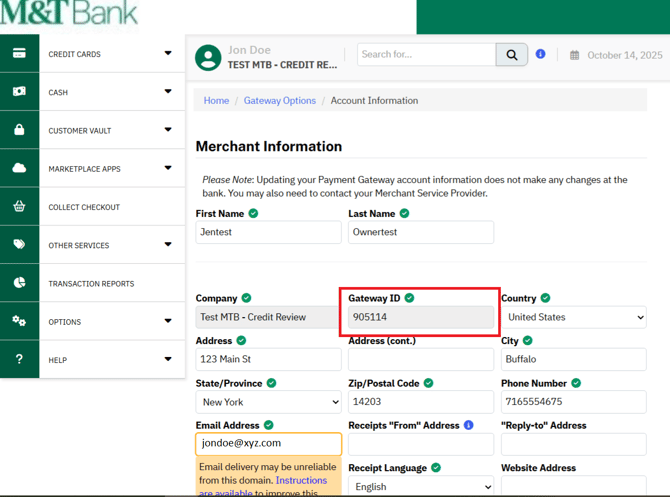
Step 3. Click on the Account Information link, Merchant Information page will be displayed
find Gateway Id -3

You will find the Gateway ID on the page highlighted in the red colour box.